
New Cardsphere Feature Drop: Text Importer

Efren Abrego • June 3, 2026

Sidequest: Card Collection by Erikas Perl
Hello traders!
Today we are pushing another long-awaited update: a text importer!
- TL; DR:
We have added the ability to paste a deck list and import directly without a CSV. - Archidekt, Moxfield, and any site with similar syntax is compatible
- Available for both Haves (My Cards) and Wants (My Offers)
How it works
We’ll use our sister site Archidekt for this example, but the importer tool is also compatible with decks exported from Moxfield and any deck builder or collection manager that exports with the same syntax.
You can find the import tool on the new tab present on both the My Offers/Wants and My Cards/Haves importer.
The text above the text field shows the aforementioned syntax that the importer expects.
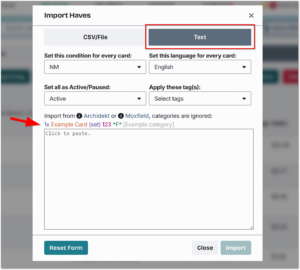
Clicking into the text field automatically pastes the deck list I exported from Archidekt, and the contents are color-coded to match the expected syntax.
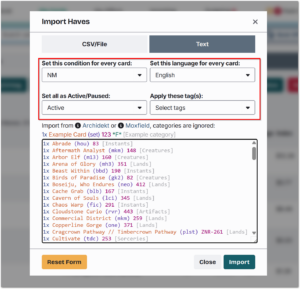
You can use the controls on this form to choose what happens when the cards are imported.
Importing Wants has a separate set of controls:
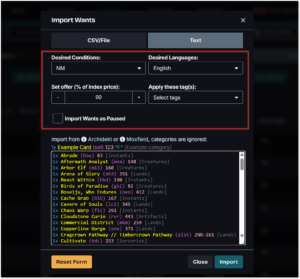
Users should note that Cardsphere will automatically set a dollar value limit on imported cards, to prevent overpaying in the event of a price spike, just as we do with CSV imports.
The limit will be 10% above the calculated offer, just like clicking the calculator button when adding or editing a Want/Offer.
If there are errors upon import, users are presented with a short summary of the failed cards:
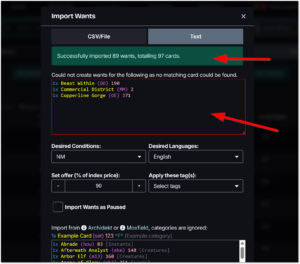
Right now, unlike with the CSV importer, the text importer relies entirely on set code and collector number, and as such, it does not yet have the ability to control set your Wants/Offers to the least expensive version, or all versions.
We are working on a solution for this and will have more on that soon.
Thanks, and happy trading!
