
Feature Drop: Remove Marketplace Purchases from Wants

Efren Abrego • March 19, 2026

Seal of Removal | Illustrated by Christopher Moeller
Hello traders!
Today we’re excited to bring you another highly requested feature: Users now have the ability to remove items from their Wants after a Marketplace purchase!
TL;DR
Here are the details:
- Users will now be prompted to remove items from their Wants at time of checkout if the items in the cart match an item on their Want list.
- If there are multiple instances of a single Want, users may choose which Want is removed.
- Default Want removal selection is selected on first-in, first-out basis.
A Bit More Detail
The acceleration of Marketplace purchases, particularly due to the new filter, quickly shined a light on what a hassle it can be for users to have to remember to remove Wants that are fulfilled via a Marketplace purchase. Not only was it annoying, but it often led to users purchasing more copies of a card than they actually wanted.
So today we’ve pushed a feature that helps alleviate these frustrations. Users will now be prompted to remove purchased cards from their Want list at time of checkout.
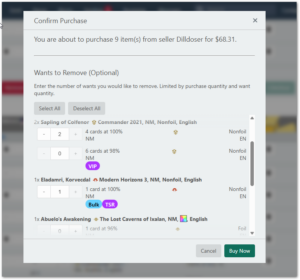
If you have multiple Wants matching one of the items being purchased, they are presented to you just as you would expect on the Wants page, which means they will be separated by differences, such as limit, tag, offer %, etc., and user may choose which Want to remove by modifying the quantity field for each item.
The total number that may be removed at this prompt is limited by the number of items purchased. If it’s a particularly large package, users may use the handy dandy Select All button. Pressing this button will automatically choose Wants for you, and if you have multiple matching Wants for a single purchase, they will be chosen by the order in which they were first created.
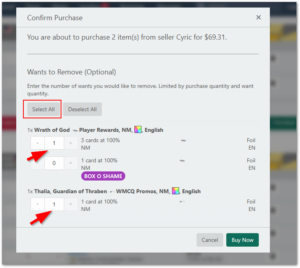
The prompt is also entirely optional, and users may just ignore it altogether if they don’t wish to manipulate their Wants.
A Couple of Caveats
The Marketplace purchase will not be complete until the form is either filled out, or ignored, and the 'Buy Now' button is clicked. Originally, we thought we would present the prompt after the purchase is made, but we made the decision that this should all happen at once, in a single database transaction, since presenting the prompt to the user after the purchase would still give time for others to commit the purchased cards to that user while they chose which versions to remove.
The other caveat is that, should the marketplace purchase by cancelled by the sender, the cards will not be added back to the Want list as users are accustomed to with traditional Cardsphere trades. This is due to the simple fact that you do not need an active Want to make a Marketplace purchase, so they are not linked to existing Wants in the way they are on traditional Cardsphere trades.
While this is not ideal, we will be making some UI updates soon that will make it much simpler to add cancelled cards back to Wants in these instances. But if it proves to be a problem even after the UI changes, it can certainly be revisited.