
Premium Update: Adding Send Page Filter Presets and Removing Premium Sealed Restriction

Efren Abrego • March 26, 2026

Long-Term Plans | Illustrated by Ben Thompson
Hello traders,
Today we’re announcing a big change to our Cardsphere Premium service. We have removed the Premium restriction to sell sealed product and have replaced it with something entirely new: presets on the send page.
TL;DR
- All users may now send or sell sealed product.
- Premium users can now save and easily switch between filter settings on the Send page.
Removing the Premium Restriction for Trading Sealed Product
Paywalling sealed as a Premium feature was a mistake, and when combined with our awkward handling of sealed pricing, sealed product has never really taken off on Cardsphere. In our first step towards correcting this, as of today, all users have the ability to trade sealed product on Cardsphere!
Although this has been in the works for a while, we felt very strongly that we should not remove a Premium feature without replacing it with a new one, so today we're doing just that.
Send Page Filter Presets for Premium Users
Premium subscribers how have an extra row on their Send page beneath the filters, which houses three renamable presets that can be used to save and switch between filter combinations.
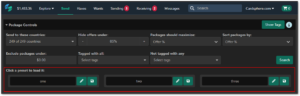
Clicking the pencil icon lets you rename the preset, and clicking the floppy disk icon (ok it’s a save icon now) saves the name. After naming them, clicking them will automatically load the the settings you had when you clicked the save button. Combine this with the Premium unlimited tags and you’ve got a powerful way to manage your outgoing sends!
How It Works
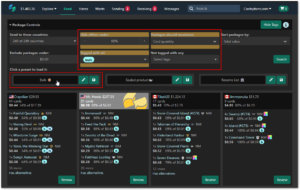
In this example, I’ve tagged all of my cards with index value less than $1 as “bulk.” If I'm sending out bulk, I’m willing to take a lower % offer, and I also want to pack the envelopes with as many cards as possible. When I'm ready to send bulk, typically I'll set my offer % to 50, change my package settings to maximize card quantity, and filter by items I previously tagged as "bulk." Since I've already saved this as a preset, this is all done by clicking the “Bulk” preset, which briefly highlights which fields have been changed, and we're ready to make packages:
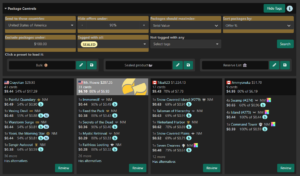
After I’ve committed any interesting “bulk” packages, I’m ready to send some sealed product. However, because of costs, I’m not willing to ship internationally, and I also don’t wish to entertain any lowball offers, so I’ve made the changes and saved them in my “Sealed Product” preset, so clicking "Sealed Product" easily swaps my filter settings:
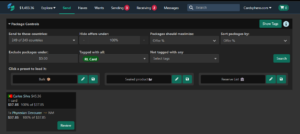
Now that I've moved some sealed product, it's time to see if anyone has any enticing offers for my Reserved List cards. I’ve already tagged them in my collection, but I’m not willing to compromise on price when dealing in cards which will never be reprinted, so I’ve saved the following preset to filter out anything but the juiciest offers:
Final Thoughts
This has been a long time coming and finally marks the start of our efforts to deliver more value to Premium subscribers. Subscribing to Premium has always been one of the best ways to support Cardsphere, and we'll continue to make improvements that deliver value to our Premium subscribers.
xoxo,
efren
